


Zona: AI Song Maker & Creator
4.51.79K Reviews
App Specs
- Version
- 7.9.2
- Updated On
- License
- Free
- Downloads
- 1,000,000+
- Developer
- AppVision LTD
- Categories
- Music & Audio
- Platform
- Android
Screenshots
 Analysis by AppCompare
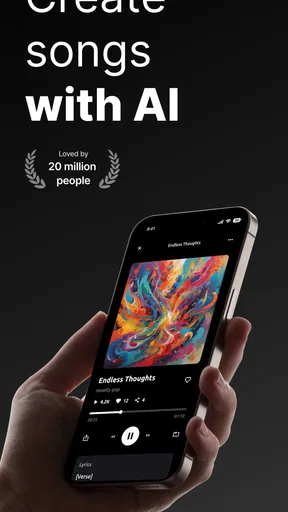
I’d choose a music-making app by asking what I want to do with it: sketch a catchy idea, learn the basics of arranging, or produce a track I can refine elsewhere. Zona: AI Song & Music Maker is aimed most clearly at the first two. It puts AI-assisted songwriting and beat creation in a phone-friendly setting, which is useful when an idea arrives before I’m near a computer. I see it as a creative starting point, not a replacement for every kind of music software.
Getting Started with Zona
The first thing you’ll notice when you open up Zona: AI Song & Music Maker is its sleek and modern interface. It’s incredibly user-friendly, so even if you’re a complete newbie to music production, you’ll feel right at home. The app guides you through the process with simple steps, making it a breeze to start creating your own tracks instantly.
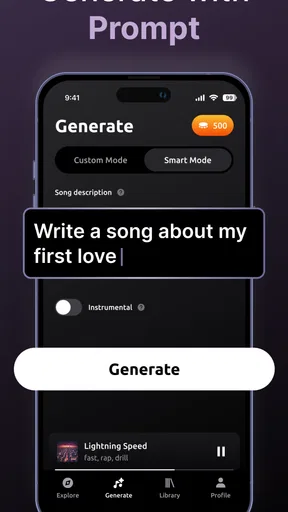
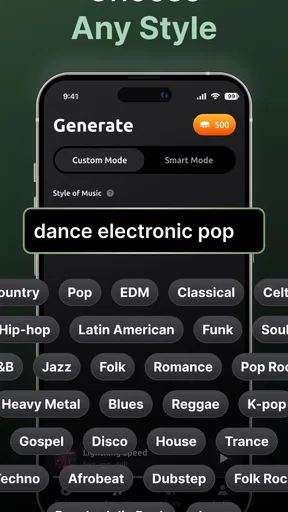
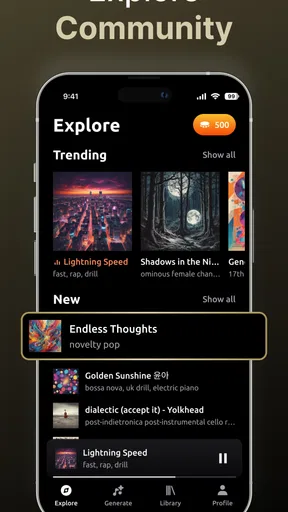
You can dive right into the action by choosing from a variety of genres and styles. Whether you’re into pop, rock, hip-hop, or electronic music, Zona has got you covered. The app uses advanced AI to help you generate beats, melodies, and even lyrics, so you don’t need to worry about having any prior musical knowledge.
Exploring the Features
What makes Zona truly stand out is its impressive array of features. The app offers a wide selection of audio loops and samples that you can mix and match to create unique sounds. The AI-powered generator is super intuitive, allowing you to tweak and adjust elements until you get the perfect tune.
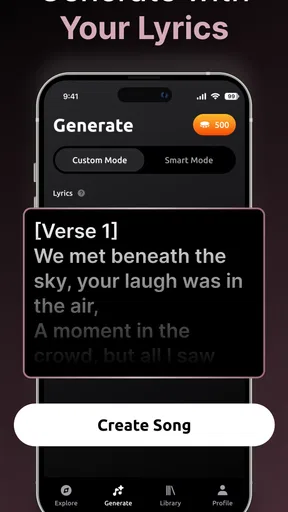
The lyric assistant is another cool feature. If you’re struggling with writer’s block, the app can suggest lyrics based on your chosen theme or mood. It’s like having a personal songwriting assistant at your fingertips!
Plus, Zona lets you record your own vocals and instruments, giving you full control over your creations. The built-in audio editor is surprisingly robust, offering tools to trim, cut, and splice your tracks with precision.
Making a Useful First Draft
I get the most value from an AI music tool when I treat its output as a sketch rather than a finished composition. A practical workflow is to decide on one clear mood or scene first, then use the generated material to find a rhythm or melodic direction worth keeping. If I ask for too many things at once, the result can feel unfocused; a narrower prompt gives me a better starting point for choosing what to edit.
Worth Reading Before You Choose

Flipboard Shows What News Apps Must Do Beyond the Feed

Switching to Android Auto Means Rethinking Your Driving Routine

Google Calendar Makes a Crowded Week Easier to Manage

Ludo King Makes the Most of the Minutes Between Plans

Baby Panda World Brings Quick Play to Modern Phones, but Its Game Library Feels Busy

ESPN’s Live Game View Makes Following Close Games Easier
The lyric assistant can also work as a way past the blank page, rather than as a substitute for personal writing. I’d keep a suggested line that sparks an idea, then rewrite around it in my own voice. That approach is especially useful for a private demo, a playful birthday song, or a short theme for a personal video. It also avoids the common trap of accepting the first generated version simply because it arrived quickly.
One useful trade-off is that AI-generated material can help me move from idea to draft without requiring theory knowledge, but that convenience doesn’t automatically make a track feel individual. I’d listen for repeated phrasing, an awkward fit between words and melody, or a beat that doesn’t support the mood I had in mind. Small edits and selective use of the generated parts matter more than generating several versions and hoping one is perfect.
A Phone-Friendly Creative Routine
For an everyday scenario, imagine I’m waiting for a friend and have a few minutes to work on a tune. I can use that spare time to test a style, jot down a lyric direction, or build a rough beat instead of trying to complete a polished song on the spot. Later, when I have a quieter stretch, I can revisit the idea and decide which elements deserve more attention. That makes the app a better fit for capturing momentum than for demanding a long, uninterrupted studio session.
Recording vocals or an instrument can make a generated sketch feel more personal, but I’d plan that step around my surroundings. A quiet room is more helpful than a noisy commute, and a quick test recording can reveal whether the performance sits comfortably over the backing. If it doesn’t, I’d adjust the idea or record again rather than spending time polishing a take that never suited the track.
The editing tools are useful for shaping a rough arrangement, particularly when a section starts or ends at the wrong moment. I’d make one change at a time and replay the transition: trimming a clip may solve a timing issue, while cutting too aggressively can remove the breath or musical lead-in that made it feel natural. This kind of incremental listening is a more reliable way to improve a draft than making several edits without checking how they sound together.
Choosing Between AI Tools and Traditional Music Apps
Zona sits in a different part of the music-making landscape from a conventional digital audio workstation. A full desktop production setup is generally the better choice when I need detailed control over recording, arrangement, mixing, or a carefully finished release. A simple loop-making app can be quicker for assembling patterns by hand, while a lyrics or notes app may suit someone who only wants to collect ideas. Zona’s appeal is bringing song generation, lyric help, and hands-on edits together in one mobile creative space.
That combination is most useful if I’m curious about making a whole musical idea but don’t yet know which instrument or production tool to learn. It is less compelling if I already have a precise arrangement in mind and want every musical decision to be manual. In that situation, a traditional production app gives me a clearer path to detailed control. If my only goal is to write words, a dedicated writing workflow may keep me focused without introducing beats and melodies I don’t need.
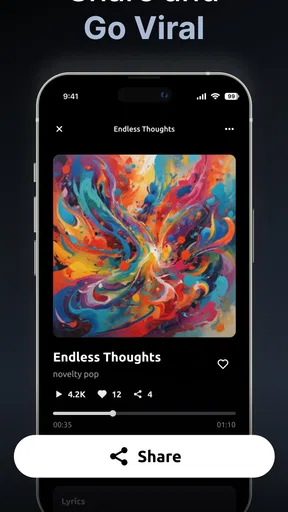
I’d also separate “shareable draft” from “release-ready master” when deciding what to do next. The app’s sharing options make it convenient to show a creation to friends or post it, but anyone aiming for a carefully finished release should listen critically and consider whether further editing in another tool is needed. The right handoff depends on the result I want, not simply on whether a song can be exported.
What to Consider Before Committing
The app is free to start, and its in-app purchases range from $2.99 to $74.99 per item. I’d spend time with the free experience before paying, then decide whether the extra options solve a real need in my workflow. A purchase is easier to justify if I’m returning to the app often and know what I want to unlock; it’s harder to justify if I’m only curious about generating one novelty track.
Switching from a familiar music app has a small but real cost: I need to learn where the creation and editing steps fit together, and I may have to rebuild an idea rather than carry over an existing project. I’d avoid moving a serious in-progress song just to try a new tool. Instead, I’d start with a fresh, low-stakes concept, see whether the workflow suits me, and keep my established setup for work that depends on precision.
Before sharing a track, I’d listen from beginning to end and check that the vocal, lyrics, and backing feel coherent together. I’d also keep a copy of any version I particularly like so later experiments don’t replace the draft I meant to preserve. These habits are useful with any creative app, but they matter especially when quick generation makes it tempting to move on before deciding which version is actually worth keeping.
Sharing Your Creations
Once you’ve crafted your masterpiece, Zona makes it incredibly easy to share your music with the world. You can export your tracks in high-quality formats and upload them directly to popular platforms like SoundCloud and YouTube. You can also share your songs with friends and family via social media or messaging apps. It’s a fantastic way to showcase your talent and get feedback from others.
For me, sharing is most helpful when I have a specific reason to do it: asking a friend whether a chorus feels memorable, sending a playful song to family, or keeping a rough idea available to listen to later. A quick reaction can reveal whether the mood comes across as intended, but casual feedback is not the same as a detailed production critique. If I want useful comments, I’d ask one focused question rather than simply sending a track and waiting for general opinions.
I’d also treat public sharing as a separate decision from making the track. First I’d listen for anything unfinished or unintentionally personal, then choose whether the song is ready for a wider audience or better kept among people I know. That pause is worthwhile: the ease of sharing is convenient, but it doesn’t remove the value of checking what I’m putting out.
Who Will Get the Most from It
I’d recommend the app to curious beginners, casual creators, and songwriters who sometimes need a nudge to start. It can make experimentation feel less intimidating because I can explore a musical direction without first learning a complex production workflow. It may also suit someone making a quick, lighthearted track for a personal occasion, as long as they’re happy to treat the result as a creative draft and make choices about what to keep.
I’d steer experienced producers toward their usual production tools when exact control and a refined mix matter most. I’d also suggest that people who dislike AI-generated suggestions may be happier composing manually. Zona’s central convenience is helping generate musical material; if that is precisely the part of the process someone wants to avoid, the app’s main advantage won’t mean much to them.
It is a music and audio app from AppVision LTD, with an Everyone content rating. It has a 4.5 average from around 118,000 ratings and over 1 million installs, so it has found a sizable audience, though popularity alone can’t tell me whether its creative approach matches my own. I’d judge it by trying a small project and seeing whether the results are enjoyable to shape, not by expecting the rating to guarantee a particular sound.
Why You’ll Love Zona
What I love most about Zona is its ability to make music creation accessible to everyone. Whether you’re an aspiring musician or just someone who loves to tinker with sounds, this app provides endless possibilities for creativity. It’s a stress-free way to explore your musical side without the need for expensive equipment or complicated software.
The app is also regularly updated with new features and content, keeping things fresh and exciting. And the best part? You can start creating for free, with options to unlock additional features through affordable in-app purchases.
The version available is 7.5.7, and it runs on Android 7.0 or later. Those details are useful if I’m checking an older device before installing, while the free entry point makes it easy to test whether the workflow fits. I’d still think of optional spending as a personal choice rather than a requirement: the sensible question is whether I’m making enough use of the app to want more than the basics.
If you’re someone who’s always wanted to make music but didn’t know where to start, Zona: AI Song & Music Maker is definitely worth checking out. It’s fun, engaging, and incredibly rewarding. So go ahead, download it now and unleash your inner musician!
My recommendation comes with one qualification: approach it as a place to discover and shape ideas, not as a promise that every generated song will be ready to publish unchanged. If a quick creative spark is what you want, that distinction is a strength. If you need meticulous control from the first note to the final mix, you’ll likely be happier using a more hands-on production option and bringing AI into your process only when it helps.
Pros
- User-friendly interface for easy navigation.
- Wide variety of music styles to choose from.
- AI-generated beats are high quality.
- Quick export options to multiple formats.
- Regular updates with new features.
Cons
- Limited free version features.
- In-app purchases can be pricey.
- Requires internet for full functionality.
- Occasional lag on older devices.
- No collaborative features for teamwork.
FAQs for Zona: AI Song Maker & Creator
What features does Zona: AI Song & Music Maker offer?
Zona: AI Song & Music Maker provides users with a powerful suite of tools for composing and producing music. It includes AI-generated melodies, customizable beats, and a variety of sound effects. Users can also access a library of virtual instruments and collaborate with others in real-time. The app’s intuitive interface makes it suitable for both beginners and experienced musicians.
Is Zona: AI Song & Music Maker free to use?
Zona offers a free version with basic features, but it also includes in-app purchases for premium features like advanced AI tools, expanded sound libraries, and additional collaborative options. Users can choose a subscription plan that best suits their musical needs, making it accessible for various budgets.
How does the AI technology in Zona work?
Zona's AI technology analyzes your input and generates melodies, chords, and rhythms based on your preferences. It learns from the user’s style and adapts to create unique compositions. This feature helps musicians overcome creative blocks and explore new musical ideas, offering a personalized music-making experience.
Can I collaborate with other users on Zona?
Yes, Zona allows users to collaborate with others in real-time. You can invite fellow musicians to join your project, share tracks, and co-create music seamlessly. This feature is ideal for bands or artists looking to expand their creative process by incorporating diverse inputs and ideas.
Is Zona suitable for professional music production?
While Zona is user-friendly for beginners, it also offers advanced features that cater to professional musicians and producers. The app supports high-quality audio export, integrates with digital audio workstations (DAWs), and provides tools for fine-tuning your compositions, making it a viable option for professional music production.


